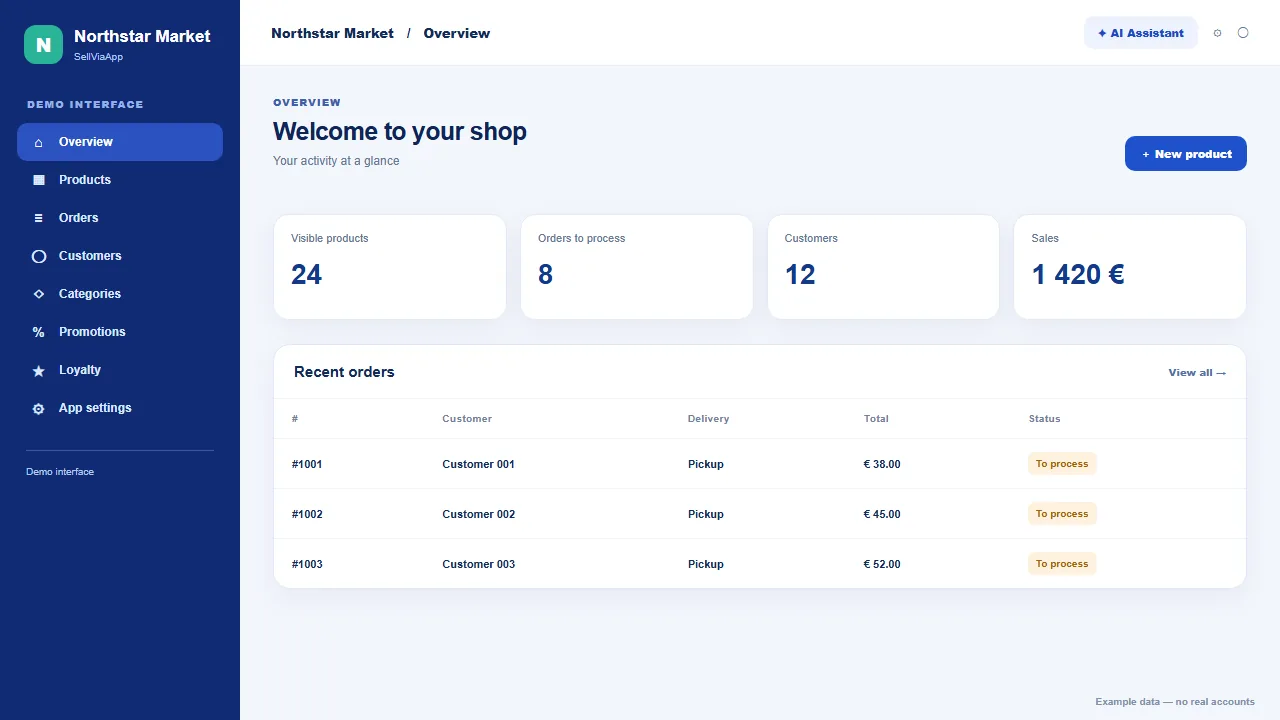
Everything to operate your shop

A complete mobile app to sell and manage your business

Present your offer, create your loyalty programme, manage your activity and invite customers into SellViaApp.

Video guide · English

See what your mobile shop can do

Discover how to manage your catalogue, choose between buying, bidding and enquiries, create faster with Selly, and keep customers connected.

Your business, your rules

Complete management without needless complexity

SellViaApp brings commercial spaces into one application without turning your business into a standardised marketplace listing.

01 · Prepare your offer

A clear catalogue, easy-to-create listings

Create products or services, organise them and adapt each listing to customer choices.

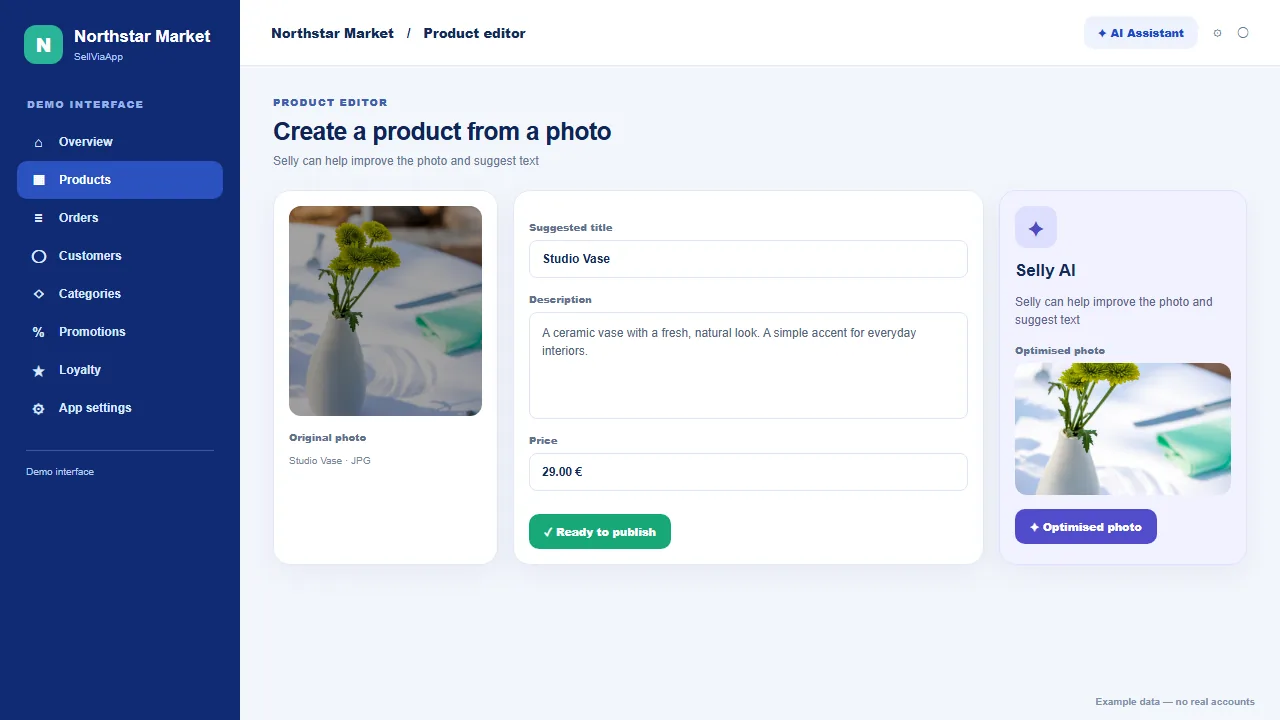
Catalogue, images and Selly

Create complete listings without multiplying tools.

  • Products or services, prices, VAT, codes and descriptions
  • Main and extra images, media library, flags and internal comments
  • Image, title and description optimisation with Selly

Categories, stock and availability

Keep a structured catalogue that is immediately clear.

  • Categories and subcategories with images
  • Exact stock or simple availability
  • Search, filters, sorting and catalogue import

Variants, options and discovery

Adapt each item to customer choices and suggest what else they may like.

  • Combine variants such as size and colour, with their own price and stock
  • Add free or paid options organised into groups
  • Suggest related products for cross-selling
  • Remind customers of viewed but unpurchased items in the app

Stock by sales location

Clear inventory for every location

Move from one stock total to inventory by shop or storage location without losing the overall view.

  • Allocate each product and variant across your locations.
  • See which location fulfils an order and track the quantities actually available.

Multi-location management is already available in the dashboard for catalogues managed directly in SellViaApp.

3.0Location selection and per-location stock in the mobile app are planned from version 3.0.

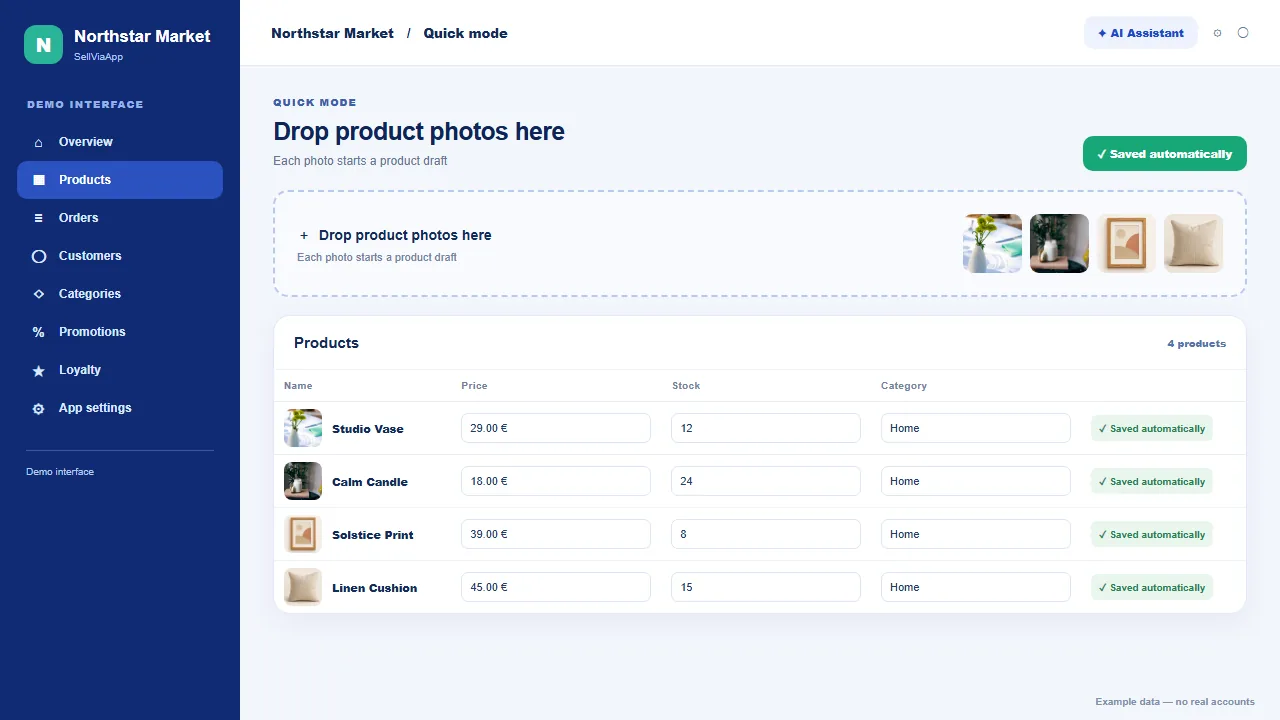
Quick mode

Photos first, product details next

Create several products without filling in every listing one by one at the start.

On desktop

Drop or select multiple photos at once from your computer.

On mobile

Take photos as you go, one after another, with your phone.

Then add each product’s name, price, stock, category and description on your phone or computer.

02 · Sell

From customer choice to order

Direct purchase, auction or enquiry: each item follows the right journey.

Delivery, pickup and payment

Adapt checkout to the way your business works.

  • Home delivery, on-site pickup or both
  • Several pickup points with a name, address and fee
  • Flat, per-product and quantity, country-based or free-threshold shipping
  • Online payment or payment on delivery or pickup according to enabled options

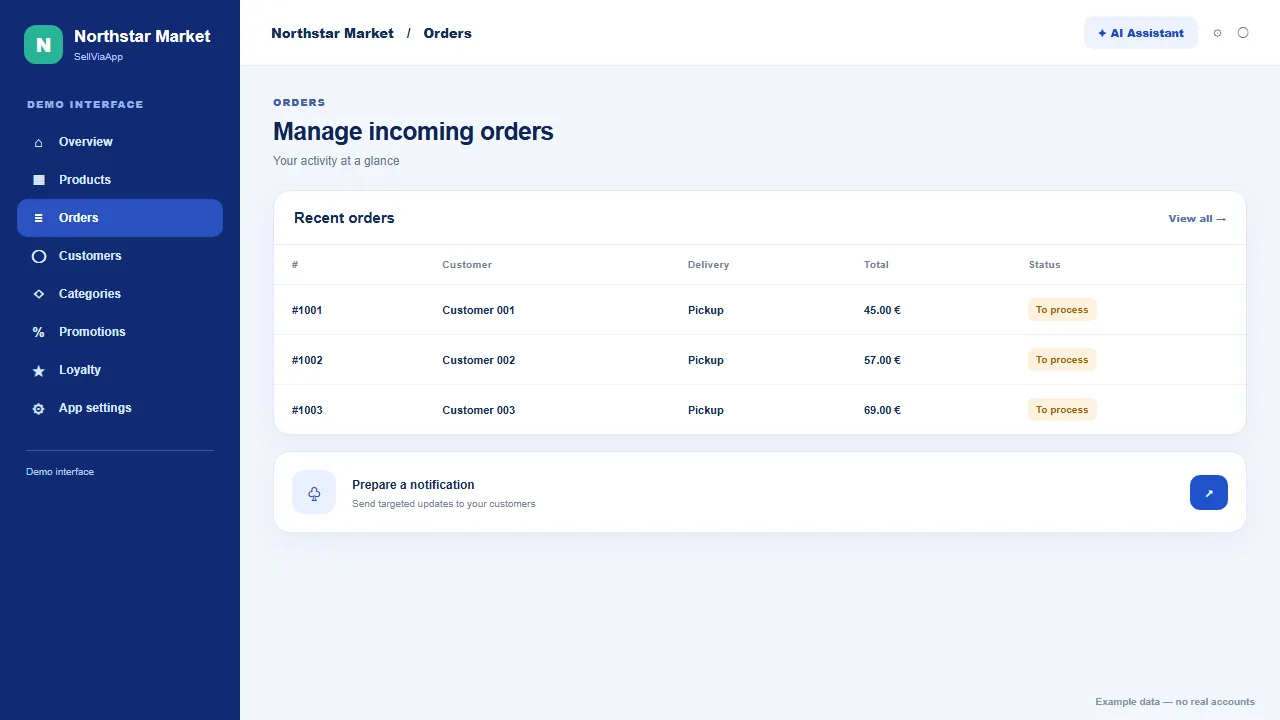
Orders and customer records

Process each sale with the useful context in view.

  • Statuses, timeline, totals, items and fulfilment method
  • Search and filters by status, delivery or pickup point
  • Customer details and recent orders available from an order

Teamwork

One order, one manager in charge

When orders arrive through your app, assign each one to the right person from the order list or detail page.

A private login for every manager

Create an individual account and choose exactly which dashboard sections they can access.

Clear order ownership

Choose who handles each order, then filter or sort the list by manager name to follow your team’s work.

You control access rights and can see at a glance who is handling each order.

3.0Manager accounts are available in the dashboard. A dedicated mobile experience is planned from app version 3.0.

Three journeys, one catalogue

The right button at the right moment

Choose the action product by product. The Android and iOS app automatically adapts the product page and customer journey.

For products and services with a defined price

Buy now

Customers add the product to their basket and continue through the normal checkout journey.

  • Clear price and fast ordering
  • Works with configured delivery, pickup and payment
  • Ideal for repeat purchases
For building competition around an offer

Auction

Set a starting price, optional buy-now price, bid increment, closing date and product-specific terms.

  • Visible bid history
  • Controlled deadline and bidding
  • Optional immediate purchase
For decisions that require a conversation

Request information

Customers open a product-linked form to ask a question or express interest without using a basket.

  • Every request stays linked to its product
  • Contact details and message in one place
  • Suited to quotes and considered purchases

03 · Build relationships

Know your customers and bring them back

Promotions, loyalty, messages and insights stay together around your business.

Targeted promotions

Create discount codes according to your own conditions.

  • Percentage or fixed codes, dates, quotas and eligible products

Communication and visibility

Stay connected with the people who use your app.

  • Immediate or scheduled notifications for everyone or one customer
  • Optional presence in the web and mobile directory
  • Tools for inviting customers and promoting your mobile shop

Analytics, preview and customisation

Monitor activity and validate the experience before sharing it.

  • Orders, revenue, customers and in-app activity
  • Interactive preview and Android or iOS testing
  • Logo, colours, language, currency, timezone and legal information

Reward customers on your terms

Build a loyalty programme that truly fits your shop

Decide how customers earn and redeem points. SellViaApp automates calculations, displays balances in the mobile app and records every movement.

In your dashboard

Your programme, your identity, your rules

✦Name and identity

Customise the programme name and even the name of your points.

↗Flexible earning

Set points per amount spent, a per-order bonus and a first-order bonus.

◷Precise conditions

Set the minimum order, cap, rounding, award status and expiration period.

%Controlled rewards

Set point value, minimum redemption, redemption steps and the maximum discount per order.

In the mobile app

A clear benefit for every customer

★1,250 points

€12.50 reward available

Customers can always see their balance, value, history and expirations.

Manage and control your programme

  • Simulate your rules before publishing them.
  • Track rewarded members and outstanding, earned and redeemed points.
  • Find a customer and add or remove points with a required reason.
  • Review the complete ledger of earnings, redemptions, cancellations, refunds and adjustments.

04 · Share your app

Your shop in your customers’ pockets

Customers use one multilingual Android and iOS app and save the shops they use.

  • Available on Android and iOS
  • Shops identified by name and visual identity
  • Public or controlled access according to each shop
  • Interface available in multiple languages
Get it on Google PlayDownload on the App Store
◎

Public shop

Enable directory visibility to feature your shop on the SellViaApp website and in the mobile application. Your name, sector and public or approximate location help local and international customers find you.

◉

Confidential shop

Hide the space from the directory and reserve access for authorised accounts when your offer must remain private.

Customer accounts and controlled access

Choose who may browse and use your shop.

  • Create, invite and reinvite customers
  • Public shop or confidential catalogue for authorised accounts
  • Session and device management when Confidential mode is active

Share it anywhere

Display one QR code. Put your shop within easy reach

Download your shop’s own QR code from your dashboard. Display it in your store, on a parcel or on your website: customers scan it with their phone and find your shop in SellViaApp.

01

Get your QR code

Your shop has its own link and QR code.

02

Display it where customers are

Shop window, counter, packaging or website: choose what works for you.

03

They scan and access the app

If the app is installed, the link can open your shop directly; otherwise the page offers Android and iPhone download links.

After installing on iPhone, customers return to the shop link to open it. A private shop still requires authorised access.
SellViaApp
Try this QR code

This example opens the SellViaApp download page. Your shop will have its own QR code.

AndroidiOS

05 · Connect your tools

Your existing environment can also power the app

No e-commerce website is required. If you already use a platform or business system, choose the relevant connector and check its available flows on the dedicated page.

Integrations and automation

Start in SellViaApp or connect your existing environment.

  • Shopify, WooCommerce, Wix and Odoo according to each connector’s flows
  • HTTPS/JSON APIs and webhooks with the Pro plan
  • Built-in support and available technical operation tracking
Products, customers and orders are unlimited in both plans. Native integrations are included in Standard; APIs, webhooks and dedicated priority support are reserved for Pro.

Exact payment, delivery and synchronisation capabilities may depend on the app type and connector. Each integration page lists the flows actually available.

View integrations →

Need another workflow?

Case tracking and bookings remain available as complementary SellViaApp ecosystem solutions.

View our other solutions →

Put your shop in your customers’ pockets.

Create your space inside the SellViaApp application, invite customers on Android or iOS and grow your mobile presence at your own pace.

Create my mobile shop — free trial

Try it before you start

Explore mobile shop demos

Browse examples for different businesses and open them in the SellViaApp mobile app.

Explore demo shops