
Public shop
Enable directory visibility to feature your shop on the SellViaApp website and in the mobile application. Your name, sector and public or approximate location help local and international customers find you.
Everything to operate your shop
An additional sales channel in your customers’ pockets: showcase your offer, receive orders and invite customers back with targeted notifications.
Video guide · English
Discover how to manage your catalogue, choose between buying, bidding and enquiries, create faster with Selly, and keep customers connected.
Your business, your rules
SellViaApp brings commercial spaces into one application without turning your business into a standardised marketplace listing.
01 · Share your app
Customers use one multilingual Android and iOS app and save the shops they use.


Enable directory visibility to feature your shop on the SellViaApp website and in the mobile application. Your name, sector and public or approximate location help local and international customers find you.
Hide the space from the directory and reserve access for authorised accounts when your offer must remain private.
Choose who may browse and use your shop.
Your new sales channel
Customers can return to your shop on their phone. Announce a new arrival or offer with a targeted notification and give them a reason to browse and order again.
Share it anywhere
Download your shop’s own QR code from your dashboard. Display it in your store, on a parcel or on your website: customers scan it with their phone and find your shop in SellViaApp.
Your shop has its own link and QR code.
Shop window, counter, packaging or website: choose what works for you.
If the app is installed, the link can open your shop directly; otherwise the page offers Android and iPhone download links.
Grow at your own pace
Your shop is first available in the shared SellViaApp app. When you decide, a dedicated Android and iOS app can be created under your name and logo. In that app, customers see only your shop.
Your merchant dashboard
The dashboard brings together products, orders, customers and settings. All these tools are also available in the mobile app in owner mode, so you can manage your shop from your phone. Explore four views of how it works.
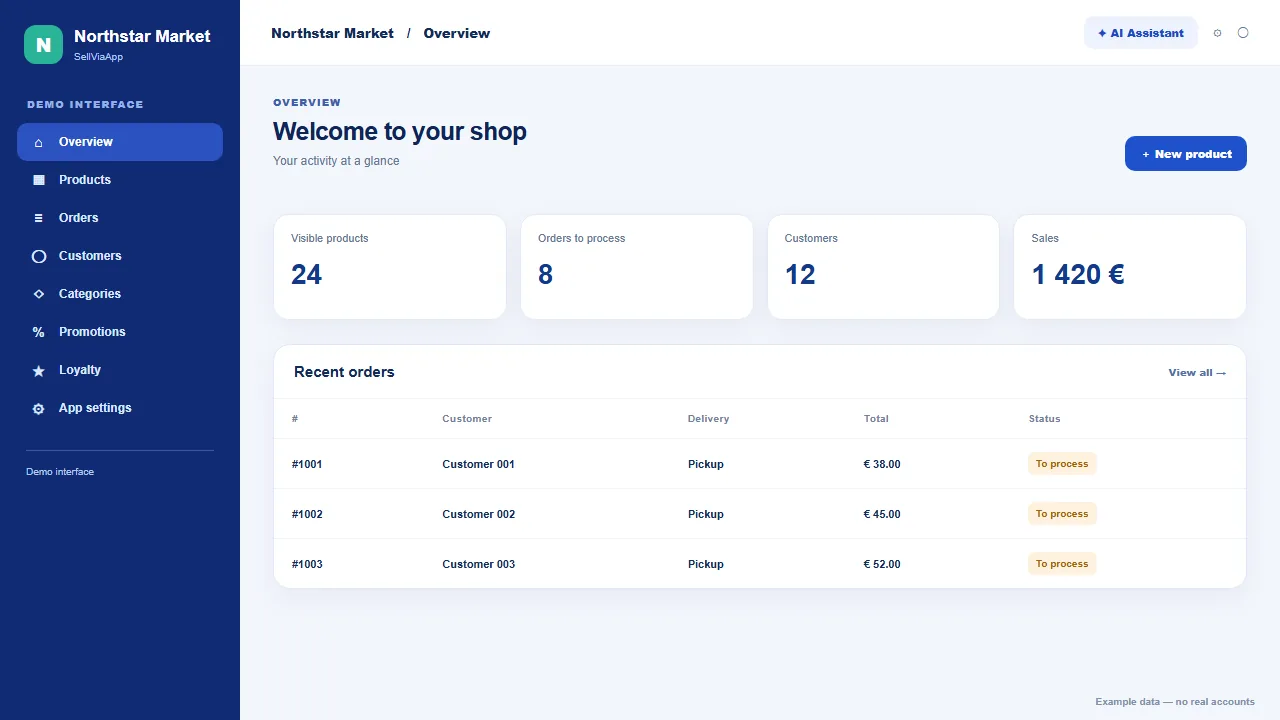
The menu opens products, orders, customers, categories, promotions, loyalty and settings. Key figures and recent orders are visible at a glance.
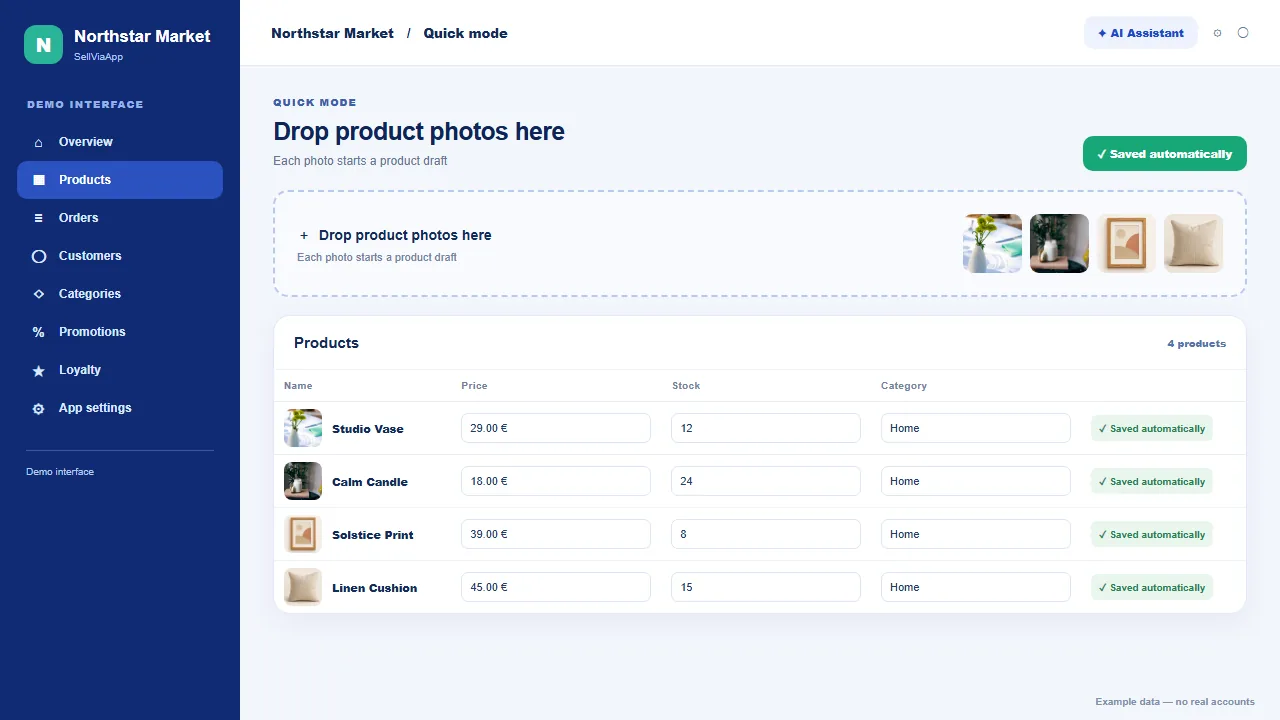
In Quick mode, drop images from a computer or take photos on mobile. Fill in names, prices, stock and categories in a list that saves automatically.
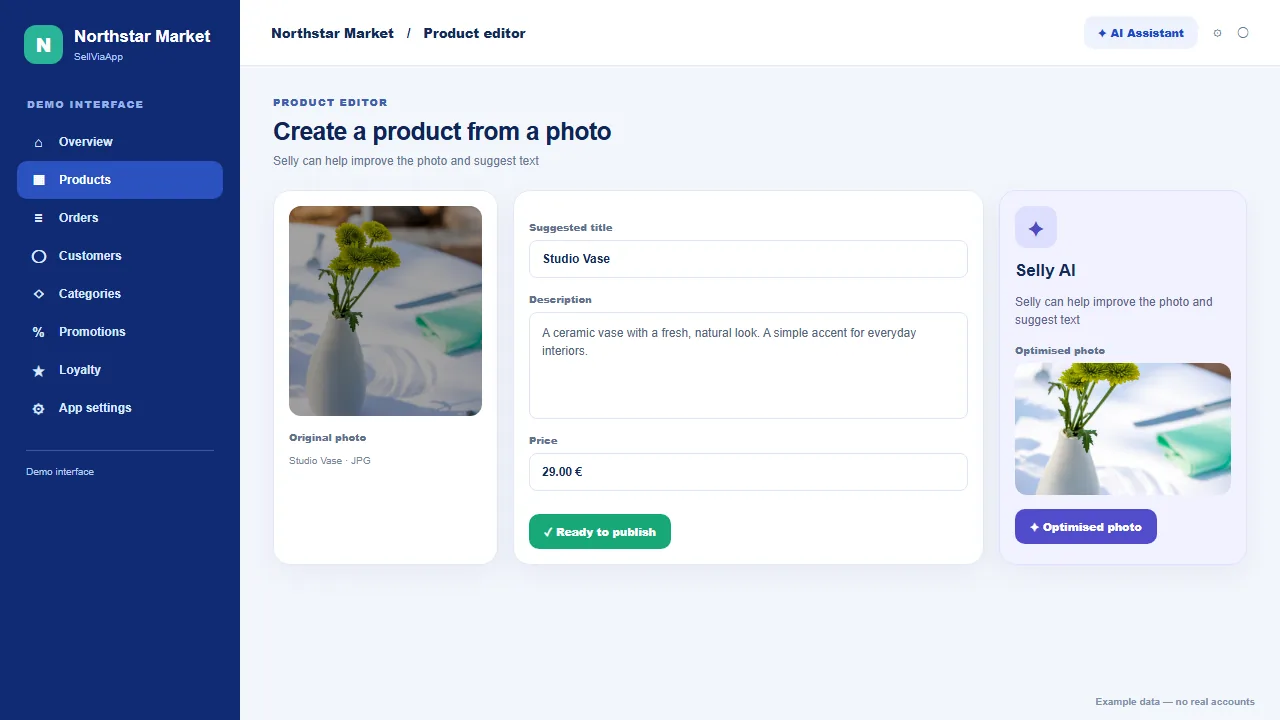
From a photo, the AI assistant can suggest a title, description and optimised image. You review the listing before publishing it.
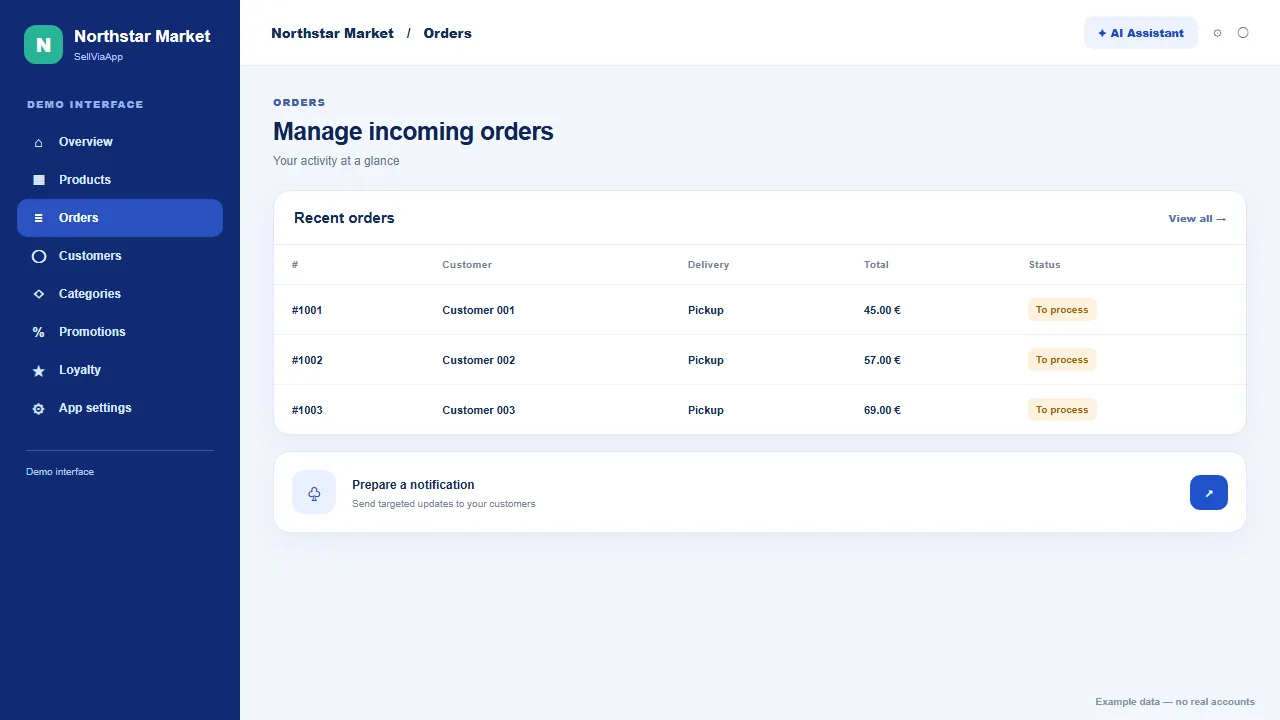
Review incoming orders and customer records, then prepare targeted notifications for people using your shop.
02 · Prepare your offer
Create products or services, organise them and adapt each listing to customer choices.
Create complete listings without multiplying tools.
Keep a structured catalogue that is immediately clear.
Adapt each item to customer choices and suggest what else they may like.
Single or multi-location inventory
One shop? Track a single stock total with no extra setup. Several locations? Allocate each product and variant to its shop.
Illustrative example · same product

One total to track for your shop.
Each shop tracks its quantity and prepares its orders.
Multi-location inventory applies to catalogues managed directly in SellViaApp.
3.0Shop selection and its stock in the mobile app require a compatible version, starting with 3.0.
Quick mode
Create several products without filling in every listing one by one at the start.
Drop or select multiple photos at once from your computer.
Take photos as you go, one after another, with your phone.
Then add each product’s name, price, stock, category and description on your phone or computer.
03 · Sell
Direct purchase, auction or enquiry: each item follows the right journey.
Adapt checkout to the way your business works.
Process each sale with the useful context in view.
Teamwork
When orders arrive through your app, assign each one to the right person from the order list or detail page.
Create an individual account and choose exactly which dashboard sections they can access.
Choose who handles each order, then filter or sort the list by manager name to follow your team’s work.
You control access rights and can see at a glance who is handling each order.
3.0Manager accounts are available in the dashboard. A dedicated mobile experience is planned from app version 3.0.
Three journeys, one catalogue
Choose the action product by product. The Android and iOS app automatically adapts the product page and customer journey.
Customers add the product to their basket and continue through the normal checkout journey.
Set a starting price, optional buy-now price, bid increment, closing date and product-specific terms.
Customers open a product-linked form to ask a question or express interest without using a basket.
04 · Build relationships
Send targeted notifications, offer promotions and reward loyalty from your mobile shop.
Announce a new arrival or offer to customers who have enabled notifications.
Create discount codes according to your own conditions.
Monitor activity and validate the experience before sharing it.
Reward customers on your terms
Decide how customers earn and redeem points. SellViaApp automates calculations, displays balances in the mobile app and records every movement.
Customise the programme name and even the name of your points.
Set points per amount spent, a per-order bonus and a first-order bonus.
Set the minimum order, cap, rounding, award status and expiration period.
Set point value, minimum redemption, redemption steps and the maximum discount per order.
€12.50 reward available
Customers can always see their balance, value, history and expirations.
05 · Connect your tools
No e-commerce website is required. If you already use a platform or business system, choose the relevant connector and check its available flows on the dedicated page.
Start in SellViaApp or connect your existing environment.
Exact payment, delivery and synchronisation capabilities may depend on the app type and connector. Each integration page lists the flows actually available.
View integrations →Need another workflow?
Create your space inside the SellViaApp application, invite customers on Android or iOS and grow your mobile presence at your own pace.
Try it before you start
Browse examples for different businesses and open them in the SellViaApp mobile app.
